
DownForge.Pro

X (Twitter) video downloader

X (Twitter) Video Downloader

A post on X can hold a video, a looping GIF, up to four photos and a whole thread of replies. Paste the link once and everything attached to it is listed, ready to save at full quality.

  • Video up to 4K
  • Looping GIFs
  • All images in a post
  • Audio only
0+Total requests
0+Parsed
0BTraffic processed
0+Platforms parsed

Please make sure you own or are authorized to use the video content.

Everything a Post Can Hold

One link, every attachment listed separately.

  • Videos

    MP4 at the resolution the author uploaded.

  • GIFs

    Saved as the looping file X actually serves.

  • Images

    All four slots, at original size.

  • Audio

    The soundtrack on its own.

  • Threads

    Media from every post in the chain.

  • Spaces & clips

    Recordings that are still public.

Three Steps, No Account

The same flow on the X app, on mobile web and on desktop.

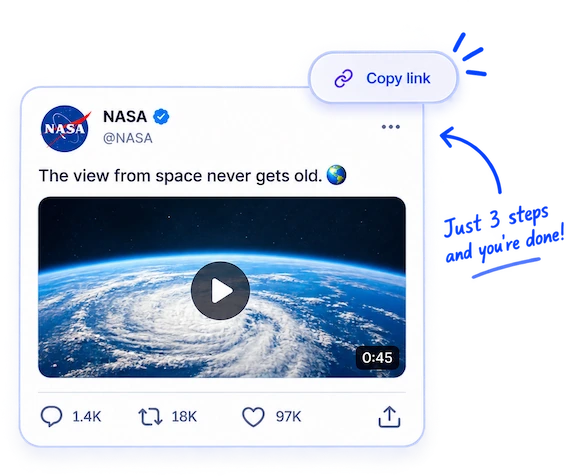
  1. 1. Copy the post link

    Tap the share icon under the post and choose Copy link, or copy the address bar on desktop.

  2. 2. Paste it above

    Old twitter.com addresses and shortened t.co links are resolved to the post for you.

  3. 3. Pick what to keep

    Video, GIF, images and audio are listed separately — choose one or take them all.

What You Get Back

Files as X stored them, with nothing re-encoded on our side.

  • MP4 video

    Every resolution X kept for that upload, from 360p to 4K when the author posted it that way.

  • JPG / PNG images

    Full-size originals, not the cropped thumbnails the timeline shows.

  • Highest bitrate first

    The sharpest version is listed at the top, so the default choice is the good one.

  • No overlay

    No handle burned into the corner and no watermark of ours added anywhere.

How X Handles Media

A few platform quirks worth knowing before you paste a link.

  • x.com, twitter.com and t.co

    The rename never broke old links. Addresses still on twitter.com, shortened t.co links from other apps and mobile links all point at the same post and are normalised automatically.

  • A GIF on X is not a .gif

    When you attach a GIF, X converts it to a short silent looping video. That is the file you get back here — it plays everywhere and is far smaller than the original animation.

  • Four media slots

    A single post can carry up to four photos, or one video, but not both. Quote posts count as their own post, so the quoted media is listed too when you paste the outer link.

  • Quality is set at upload

    X re-encodes what it receives into a ladder of resolutions. If the author uploaded at 720p, no tool can produce a 4K copy — the top entry here is simply the best one that exists.

Which Posts Can Be Saved

The rule is simple: if a post opens in a private browser window without asking you to log in, its media can be fetched. Anything from a public account works this way, including quote posts and long threads.

Protected accounts are different. Their posts are shown only to approved followers, so no public link exists and the web tool cannot reach them. Posts marked as sensitive sit behind an interstitial for signed-out visitors and behave the same way. For those, the desktop app works from your own logged-in session instead.

  • Deleted posts and suspended accounts leave nothing to fetch.
  • A Space can only be saved while its recording is still public — hosts can remove it at any time.
  • Save what you have the right to keep, and credit the author if you post it somewhere else.
What the web tool can't reach, the app can

  • Works from your own session, so paid and private content opens
  • Batch through a whole profile or collection
  • Available for Windows and macOS
Download Desktop App

Everything You Need to Know

Do I need to log in to X?

No. Public posts are read the same way a browser reads them, and nothing is sent to your account.

Can I download a Twitter GIF as a real .gif file?

The file you get is the looping silent MP4 that X serves, because that is what a GIF becomes once it is uploaded. Any converter can turn it into a .gif afterwards.

How do I save all four images from one post?

Paste the post link and open the Images tab. Every image is listed on its own, and you can save them one by one or all at once.

Does the author know I saved their video?

No. There is no notification of any kind, and your name never appears anywhere.

Why is the video only 720p?

Because that is what was uploaded. X stores a ladder of resolutions for each video, and the highest one here is the best version that exists on their servers.

Can I download from a protected account?

Not with the web tool — protected posts have no public link. The desktop app can, using your own session, if the account has approved you as a follower.

Does it work with old twitter.com links?

Yes. Legacy twitter.com addresses and t.co short links are resolved automatically, so you do not have to rewrite anything.

Can I save a whole thread at once?

Paste the link to any post in the thread and the media attached to the posts in that chain is listed together.

Is there a limit on how many posts I can save?

Free use has a daily limit shown on the page; a Pro plan removes it. Nothing is capped per post.

Can I get only the sound from a video?

Yes. The audio track is listed separately, which is handy for a clip you want to listen to rather than watch.

Does this work on a phone?

Yes. Paste the link in your mobile browser — there is nothing to install on either iOS or Android.

A link does not work — what now?

Open it in a private window first. If X asks you to sign in, or the post has been deleted, there is nothing public left for the downloader to read.

Human support, not AI